Table of Contents
- Rationale and Specification
- Showcase
- Overview of Code
- Conclusion
- Resources
Rationale and Specification
Wanting to further improve on my programming skills, I decided to develop a simple Java program that I could use to organize a Secret Santa for me and my friends. Specifically, I wanted a way for everyone to be assigned another person without anyone knowing someone else's pairing (including me).
My initial goals with this program included:
- A command-line interface that easily allows for someone to:
- Create a list of participants
- Create Secret Santa pairings randomly
- A way to view each pairing one by one in a way that each person could see their pairing secretly
However, after doing this, my program was flawed because it required everyone participating to be using the same console output. Instead, I needed a way to reach each participant individually and send a message automatically (in a way that I couldn't see). Since many people have email, I decided to use this medium as a way to reach everyone individually.
So, I made a new additional goal which was to:
- Reach everyone individually through email automatically
Showcase
- Sample Output (Github)
- Source Code (Github)
Overview of Code
Participant Class
This class outlines and represents a participant in Secret Santa. It stores information regarding the participant and the specific sender and recipient of the participant.
The source code for Participant.java is available on Github.
Explanation of Participant Class
In this file, I create a class for a Participant object. This object stores different pieces of information in its fields:
The participant's name (String)
The participant's email (String)
The participant's recipient (Participant)
The participant's sender (Participant)
Initially, the Participant object did not include a field for the participant's email, but after adding my new goal, I incorporated an email field.
Additionally, the class had:
- accessor/getter methods that simply returned the fields I had created
- accessor/getter method: a method that returns the value of a field
- two mutator/setter methods that set the recipient and sender for the object
- mutator/setter method: a method that changes and alters a field
- "has" methods that returned whether or not fields were set
- hasSender
- checks whether or not the sender field is set to another participant object (not null)
- hasRecipient
- checks whether or not the recipient field is set to another participant object (not null)
- hasSender
- "reset" methods that would set fields to their defaults
- resetSender
- resets the sender field to null
- resetRecipient
- resets the recipient field to null
- resetSender
Using this simple class, I was able to create an object that was well structured for what I needed for my Secret Santa program. The name and email fields are pretty self-explanatory. I needed a way to help identify a specific person and also needed their email so that my email functionality would have an address to reach. For the recipient and sender objects, I decided to have them be other participant objects so that it would they could be referenced from within the specific participant. This way, I made use of the reference semantics that objects have and could actually link a specific participant object to another. Additionally, by having the "has" methods, I was able to check if each participant had a sender and a recipient. With the "reset" methods, I would be able to remove the sender and recipient of each participant.
SecretSanta Program
This program uses the Participant class and allows a user to:
- create a list of participants
- list all the participants names and emails
- create "Secret Santa" pairings
- Each participant is randomly assigned a person to send a gift to.
- There should not be two people sending a gift to the same person.
- view all the "Secret Santa" pairings
- view the recipient for a specific participant
- scroll through each recipient for all participants one by one
- save the participants list, their emails, and their pairings to a desired file
The source code for SecretSanta.java is available on Github.
Explanation of SecretSanta Program
Helper Methods
I like to use helper methods that help with decomposing code and reducing redundant code.
- Helper method
- a method that helps another method (usually larger and more complex)
- Code decomposition/factoring
- breaking complex code into smaller parts that are easier to understand and write
printHighlighted Method
This helper method simply "wraps" text around an input string. Then, it prints this "wrapped" string to the console.
allHaveMatches Method
The allHaveMatches method iterates through each participant and returns whether or not each participant has a recipient or a sender. It uses an "innocent until guilty" check in where the method returns true (innocent) after iterating through each participant and returns false (guilty) once it finds a participant without either a recipient or a sender.
// Checks if all participants have matches/pairings
// Parameters:
//    Participant[] participants = the desired list of Participant objects
// Returns:
//    whether or not all participants have matches/pairings (boolean)
public static boolean allHaveMatches(Participant[] participants) {
  for (Participant person : participants) {
      if (!person.hasRecipient() || !person.hasSender()) {
        return false; // one is guilty
      }
  }
  return true; // all are innocent
}
resetMatches Method
For this method, it iterates through each participant and calls the resetRecipient and resetSender methods to reset the matches/pairings of each participant.
clearScreen Method
In the clearScreen method, it "clears" the screen by flooding the output by printing blank lines. This allowed me to show each participant individually by clearing the screen after each participant one by one.
promptInt Method
This method simply prompts the user for an integer.
promptFile Method
For the promptFile method, it prompts the user for a filename (without the file extension) and then adds ".txt" to the end so that the files are always text files.
intro Method
This method prints the introduction of the program. It purely uses the printHighlighted method to print out text to the console.

createParticipants Method
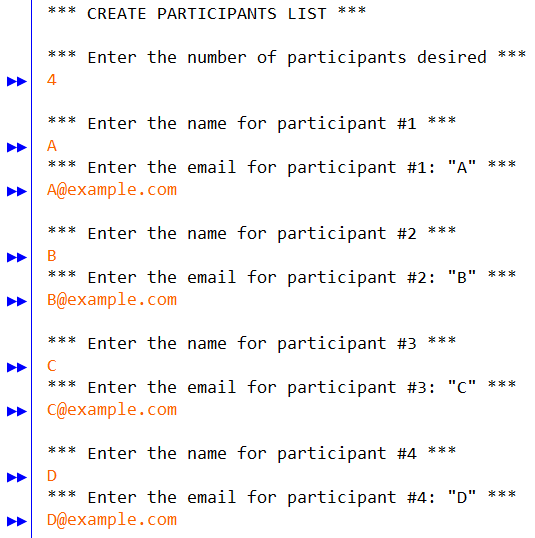
For the createParticipants method, I decided that my list of participants would be contained within an array of participant objects. This way, I could pass the array around to the different methods and change them according to what I wanted. First, I prompted the user for the number of participants and create a blank participant object array with that specific size. Then, I iterated through each index of the array and prompted the user for the names and emails of the participants. After, I created a new participant object to put in that specific index. In the end, I return the newly create participant objects array.
listParticipants Method
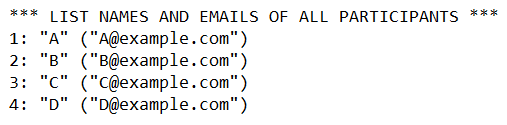
The listParticipants method is pretty simple. It iterates through each index of the participant object array, formats the name and email, and then outputs it to the console. Although I had this method as a standalone feature, I also used it as a helper method later in the printSpecific method so that I would be able to reduce redundant code.
assignRecipients Method
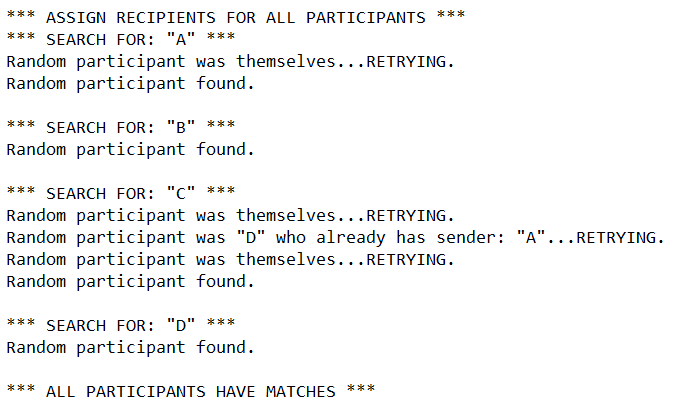
Assigning the matches/pairings for all the participants, the assignRecipients method is definitely the most important method in the entire program.
// SecretSanta.java assignRecipients Method (modified)
// Some parts are omitted or adapted. The full source code is available on Github.
// RETRY_COUNT_MULTIPLIER is a class constant that represents the threshold
// multiplier to reset the loop when an impossible matching scenario occurs

boolean allHaveMatches = false; // so that the loop is entered
while (!allHaveMatches){ // continuously loops until everyone has a match
    resetMatches(participants); // reset all the matches/pairings

    // find a match/pairing for each participant
    for (int i = 0; i < participants.length; i++) {
      Participant person = participants[i]; // the current participant

      // to avoid infinite loop when an impossible matching scenario occurs
      int retryCount = 0;

      // continuously loops until the current participant has a
      // recipient OR until retryCount is above the retry threshold.
      while (!person.hasRecipient() &&
            retryCount < participants.length * RETRY_COUNT_MULTIPLIER) {

          // random index of Participant in participants array
          int num = rand.nextInt(participants.length);

          // NOT themselves AND the randomly selected recipient
          // does NOT already have a sender/gifter/"Santa"
          if (num != i && !participants[num].hasSender()) {
            // sets the randomly selected participant
            // as the current participant's recipient
            person.setRecipient(participants[num]);

            // sets the current participant as the
            // randomly selected participant's sender
            participants[num].setSender(person);
          } else {
            // failed attempt; increment counter
            retryCount++;
          }
      }
    }
    // checks all participants to see if they all have matches/pairings
    // loop control variable is set accordingly
    allHaveMatches = allHaveMatches(participants);
}
The main issue while I was intially writing this method was that I had not thought about what would happen when an "impossible matching scenario" occured. An "impossible matching scenario" is where the participants are paired in a way where usually one person is left without another participant to match with since they all already have matches.
An example of this is depicted below:

In this example, D is left without a participant to send a gift to. This is what I called an "impossible matching scenario." To fix this, I reset all the matches and continued to pair the participants until everyone had a match.
There is most likely a more optimized and efficient technique to do this, but I wrote this program with what I had learned in CSE142, an introductory programming class. Using mostly the knowledge from class, I think the algorithm I wrote is pretty good for what I had learned.
printAll Method
This method is very similar to the listParticipants method. However, along with printing the name and email of each participant, this method also prints the recipient of the participant.

printSpecific Method
In the printSpecific method, it first uses the listParticipants method, then prompts the user for a specific participant, and prints out the recipient of that particular participant. After all this, the screen is cleared using the clearScreen method.
scrollAll Method
Similar to the printSpecific method, this method iterates through each participant and prints the recipient of that particular participant. In between each participant, it clears the screen using the clearScreen method and shows a blank screen for the next participant. This way, I can discretely show each participant their recipient. However, a downfall to this is that it requires a way for everyone to see the console output. This issue prompted me to create a way to send emails to each participant automatically.
saveAll Method
Initially, I had the saveAll method just dump all the information and pairings for the participants in a file. This dump was just used in case someone wanted to save the pairings. It was unorganized and unstructured. However, after wanting to implement an emailing functionality into the program, I had to make this unsorted dump into a format that would be easier to parse. To do this, I decided to group the data for each participant and separate the participants with a blank line. Additionally, each different piece of data for a single participant was to be on its own separate line.
For example, the output for a single participant would look like this:
Participant #1
Name: "A"
Email: "[email protected]"
Sender (their Secret Santa): "D"
Recipient: "C"
A full sample output file created from the saveAll method is available on Github:
Sample Output File of SecretSanta.java
Although not really necessary for my email sending program, the headings on each line serve to help someone reading the plain text file. In my SendEmail program, it simply discards the unneeded parts of the output file.

main Method
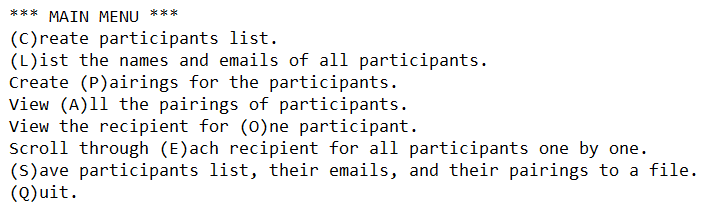
For the main method of the program, I first initialize variables for a Random object and a Scanner object. Then, I print the introduction to the program and prompt the user to create a list of participants. After, it enters a while loop (the main menu) that prompts the user to execute specific methods until the user quits.
SendEmail Program
This program takes an output file from the SecretSanta program and sends an email through Gmail that details the specific recipient for a participant.
The source code for SendEmail.java is available on Github.
JavaMail
To help me send emails in Java, I decided to use JavaMail. In order to actually use the SendEmail program, I had to add JavaMail to the classpath first. Under the FAQ page, JavaMail provides instructions on how to install the JavaMail API. Then, I followed the answer on sending email using Gmail and incorporated JavaMail into my SendEmail program. However, an important note that I figured out while using Gmail was that since I had two-factor authentication enabled on my account, I had to create an app password to authenticate my account for my program.
Explanation of SendEmail Program
In my SendEmail program, I use a Scanner to go through the lines of the output file created from the SecretSanta program. Since I know the exact format that the SecretSanta program outputs, I can also process the input file for the SendEmail program according to how the file is structured. Processing the file line by line, it processes the specific pieces of information regarding the current participant and puts it into variables. The SecretSanta program also groups each participant's information together. This way, the SendEmail program can process each participant individually. Next, it creates a formatted message using the different variables and then sends a message to the email of the participant. This continues until there are no lines (no participant information) left in the file.
Conclusion
This Secret Santa program was a very fun and useful program because it allowed me to create a meaningful program that my friends and I could use. After writing this program, I was actually able to use it to organize a Secret Santa for my group of friends. Although it might not have been the most efficient or elegant way to write this program, I am very happy with the final product. Incorporating my learning from CSE142, I was able to accomplish a task that I wanted to complete. The main concepts covered in class that I used included:
- Random objects to create "randomness"
- Scanner objects to process text and files
- PrintStreams to output to a file
In writing this program, I also had to learn a new concept which included:
- sending emails through JavaMail
By combining my previous knowledge with new concepts, I think by making this Secret Santa program it really helped me improve my programming. Additionally, since it allowed me to completely organize a Secret Santa by myself, it gave me a way to provide something meaningful to my friends.